

| Prerequisite | Requirement |
|---|---|
| Safina Plan | Personal or higher |
The way your business communicates shapes your brand image. To make your AI assistant fit seamlessly into your overall presence, you can fine-tune its voice and speaking style.
Whether you prefer a very formal approach or address your customers in a casual, friendly manner — Safina adapts to your company culture. Here’s where you can adjust these important settings.
How to Adjust the Speaking Behavior
The settings for your assistant’s character are located in the central configuration area.
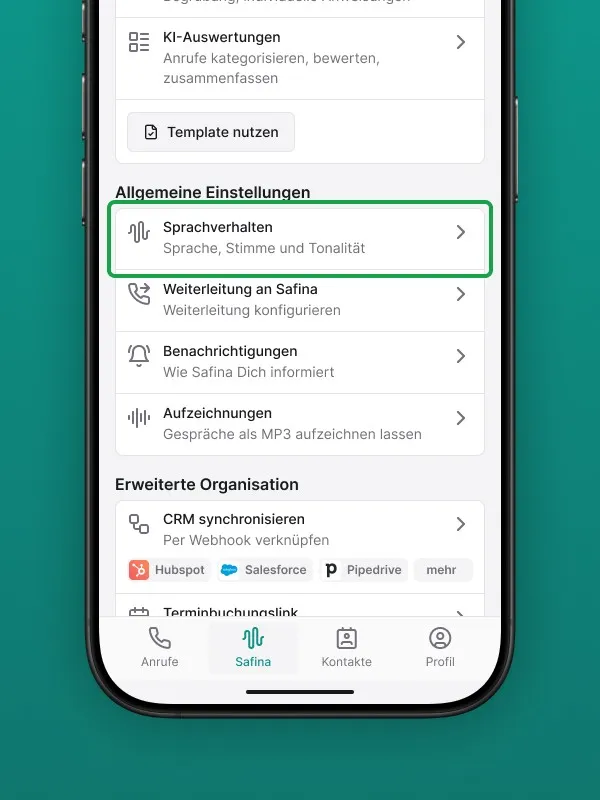
Step 1: Navigate to the Configuration Tab
Open your Safina app and go to the “Safina AI” tab.
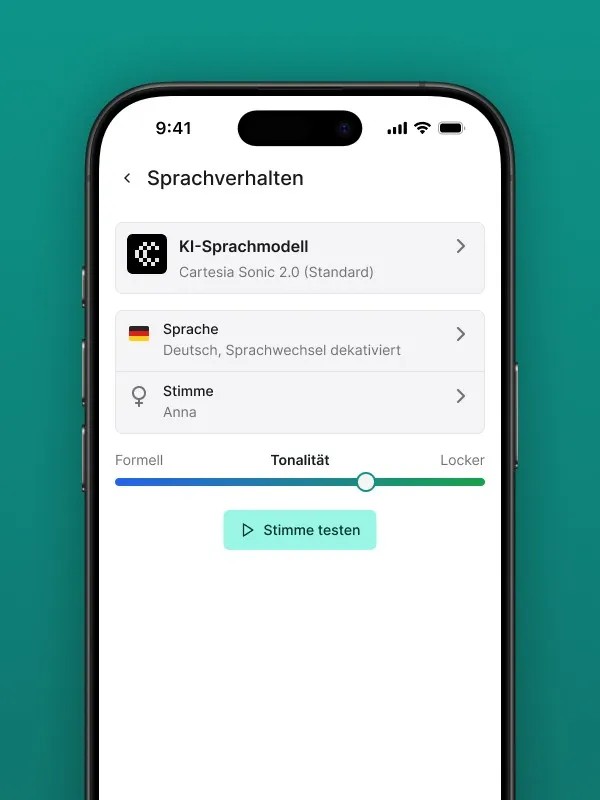
Step 2: Open the “Speaking Behavior” Section
Scroll through the available options until you find the “Speaking behavior” section. This is where all settings related to the sound and style of your assistant are grouped together.
Step 3: Customize the Settings
Within the speaking behavior section, you can personalize two key aspects.
Choosing the Voice
In the “Voice” dropdown menu, you’ll find a range of different voices. Choose the one you like best and that fits your business. This is purely a personal preference and doesn’t affect what Safina says — only how it sounds.
Setting the Tone (Formal or Casual)
The “Tone” slider is a crucial setting for your assistant’s character. This is where you define how formal or personal Safina interacts with your callers.
- “Professional” setting (left): In this position, Safina will consistently and politely address your callers in a formal manner. The word choices will also be more formal.
- “Casual” setting (right): In this position, Safina will use a friendlier, more personal approach with your callers.
Choose the setting that matches your typical communication style with customers to leave a consistent impression. The change is saved immediately and takes effect on the next call.
A Cohesive Overall Impression
By customizing the voice and tone, Safina transforms from a useful tool into a true member of your team. You ensure that every caller is greeted from the very first moment in the way they’d expect from your business.
Your Safina Team