

There are call situations that require individual handling beyond standard automation. With the “Transfer to a Human” feature, Safina AI provides an interface to flexibly hand off callers to a phone number you define.
While we use this name in the dashboard, it’s technically an open bridge: you decide which number is stored and under what conditions Safina initiates the transfer.
Availability
The intelligent call transfer (Smart Call Transfer) feature is designed for our professional business solutions.
| Feature | Details |
|---|---|
| Availability | Business or higher |
How It Works and Activation
Once you activate the transfer in the web app and store a number, Safina is ready to hand off calls. By default, Safina offers the transfer whenever a caller explicitly requests it (e.g., “I’d like to speak to someone in person”).
If you want more precise control over this process, use your conversation guide. There, you can define specific scenarios:
- Restricted transfer: You can instruct Safina to only transfer calls when, for example, a technical emergency is reported.
- Targeted triggers: You can specify that the transfer is only offered after certain qualifying questions have been answered.
- Custom logic: The feature is fully flexible — in theory, the number could even lead to a specialized AI agent or a different team.
More on this: How to set up custom instructions and logic for your AI is explained in detail here: Creating New Questions and Instructions in the Conversation Guide
Configuration in the Web App
Setup is done centrally in the settings area of your Safina AI platform.
- Log in: Sign in to the Safina App.
- Section: Navigate to the “Safina AI” tab and scroll to the general settings.
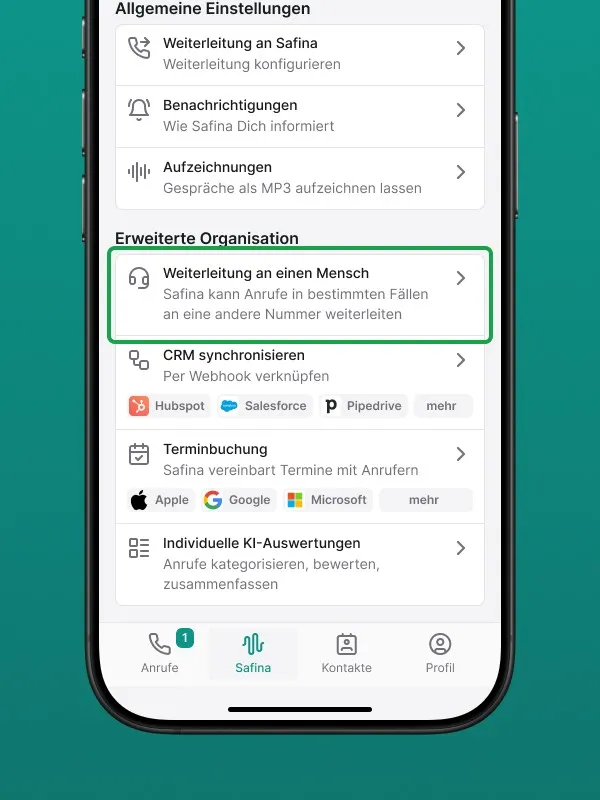
- Select: Click on “Transfer to a Human”.
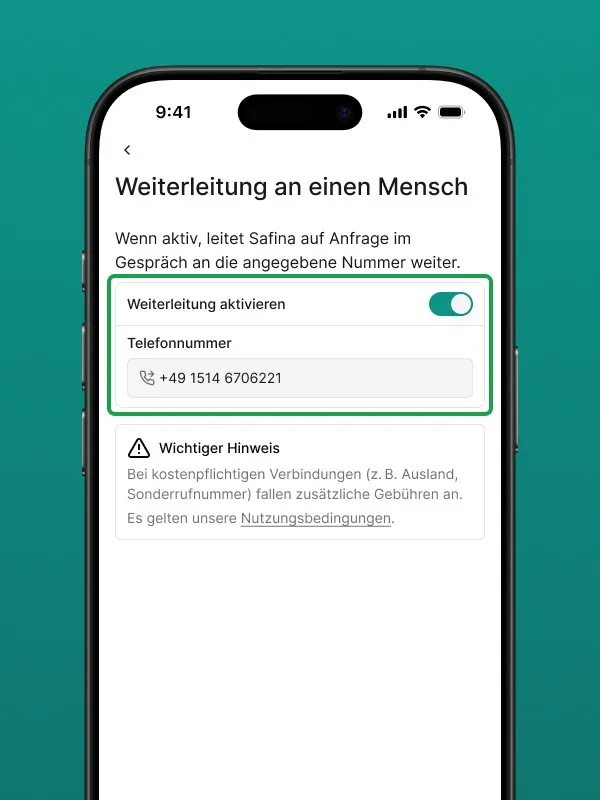
- Number: Enter the desired target phone number (ideally a domestic number).
- Activation: Toggle the switch to enable the feature.
Important Information About Connection Costs
Technically, Safina establishes an outgoing connection from your Safina number to the number you’ve stored. Domestic connections are generally straightforward, but the following policy applies for cost transparency:
Note on Fees: Safina AI does not cover costs for transfers to premium-rate numbers (e.g., special service numbers or international connections). If the number you’ve stored incurs costs, we will bill them to you at cost plus a processing fee.
We therefore recommend always using a regular landline or mobile number in the same country where your Safina number is registered, to keep costs to a minimum.
Conclusion
Call transfer is the bridge between AI efficiency and personal attention. By activating it in the dashboard and fine-tuning it in your conversation guide, the feature can be precisely integrated into your existing business structure.
Ready to set up your call transfer?
Log in to the web app and enter your number under “Safina AI.”
Would you like us to show you next how to create a “VIP list” so certain callers are transferred immediately without any detours?