

| Requirement | Details |
|---|---|
| Safina Plan | Personal or higher |
Your AI assistant is a powerful tool for filtering and organizing your workday. But some calls are so important or personal that they should always come through to you directly.
That’s exactly why you can selectively deactivate Safina for specific contacts. Think of it as creating a “VIP list” for the people who should never speak to an assistant.
Prerequisite: Imported Contacts
To use this feature, you first need to have imported your address book into the Safina app. This is the only way Safina can match an incoming number to a contact and apply the corresponding rule. If you haven’t done this yet, you can find the guide here: Guide: Importing and managing contacts in Safina
How to Deactivate Safina for a Contact
The process is straightforward and takes just a few clicks.
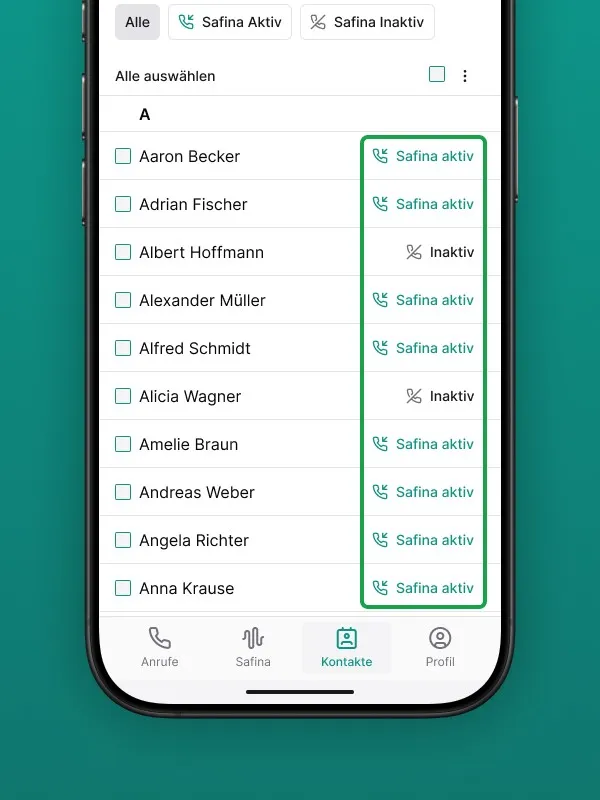
Step 1: Open the Contacts Tab
Open your Safina app and navigate to the “Contacts” tab in the bottom menu bar. Here you’ll see a list of all your imported contacts.
Step 2: Find the Contact
Scroll through the list or use the search bar at the top to find the person or company you want to create an exception for.
Step 3: Toggle the Switch
To the right of each contact name, you’ll see a switch that is set to “Active” by default.
- Simply tap this switch to deactivate Safina for that specific contact.
- The switch will change its color and position to indicate that the setting is now “Inactive” for this contact.
You can reverse this setting at any time using the same process.
What Does “Safina Deactivated” Mean?
When a contact on your exception list calls you and you miss, decline, or are unavailable for the call, the following happens:
- The call will NOT be forwarded to your Safina assistant.
- Your phone behaves as if no forwarding were set up. The call goes to your regular voicemail (if enabled) or simply rings out.
Your Personal VIP Entrance
This feature gives you full control over who uses the automated service and who always has a direct line to you. It’s the perfect way to combine the efficiency of an AI assistant with the personal availability you want for your most important relationships.
Your Safina Team