

| Requirement | Details |
|---|---|
| Safina Plan | Professional or higher |
Sometimes tone of voice says more than a thousand words. While a transcript captures the content of a conversation, an audio recording provides the full context — including nuances, mood, and speaking pace.
Safina gives you the option to record entire conversations as audio files. This feature is especially useful for training purposes, quality assurance, or complex matters where every detail counts.
Important Legal Notice: Consent Is Essential
Before we get to the setup, there’s an important point to address: the legal side. In Germany and the EU, the law requires (GDPR) that you obtain explicit consent from all parties before recording a conversation.
The good news: you don’t have to worry about this yourself.
We’ve built the solution directly into Safina so you’re on the safe side legally.
- Once you activate recording, Safina will automatically provide a clear notice at the beginning of every conversation.
- This notice says something like: “Please note that this conversation is being recorded. By continuing the conversation, you consent to the recording.”
When the feature is deactivated, this statement is naturally not included.
How to Enable Call Recording
The setup takes just a few clicks.
Step 1: Navigate to the Configuration Tab
Open your Safina app and go to the central settings area, the “Safina AI” tab.
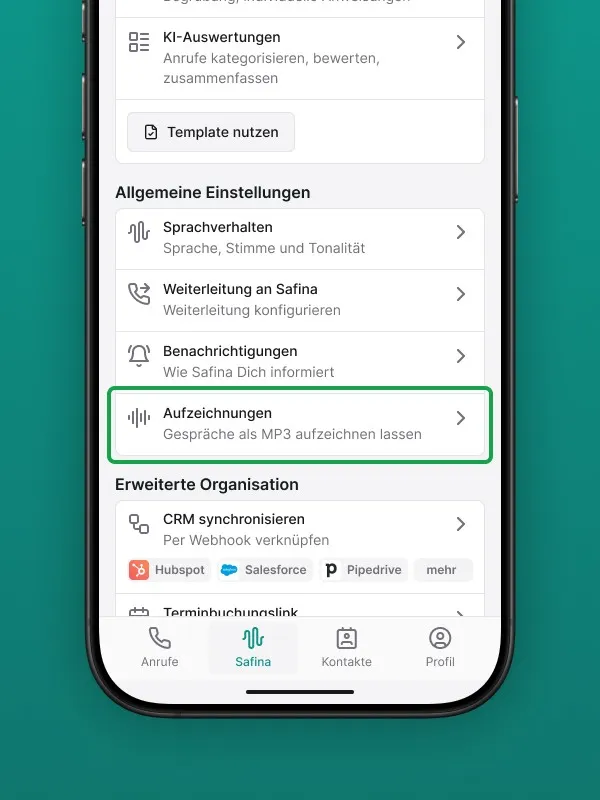
Step 2: Find the Recording Setting
Scroll through the list of configuration options until you see the “Recording” or “Audio recordings of calls” section.
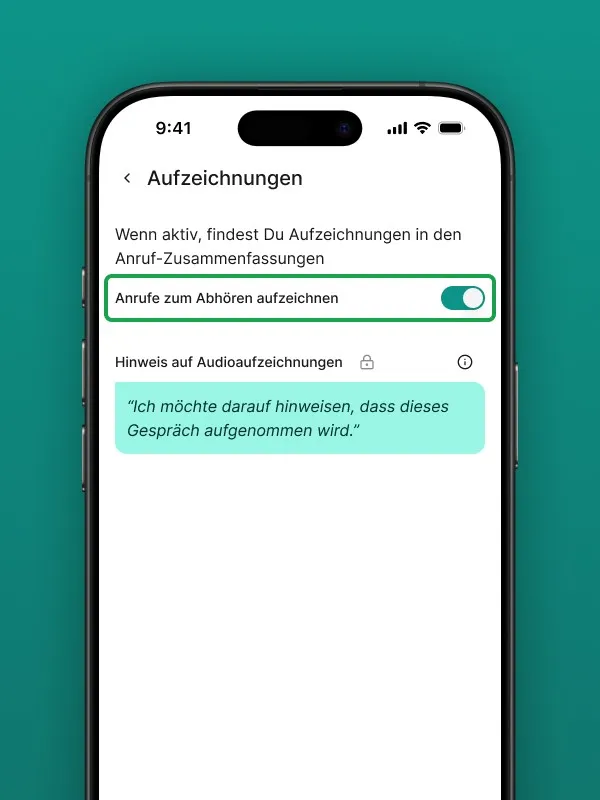
Step 3: Activate the Feature
Here you’ll find a simple toggle. Switch it on to enable call recording.
That’s all there is to it. From this moment on, Safina will obtain consent and record conversations for you.
Where Can I Find the Recordings?
The audio files aren’t stored in a separate log — they’re integrated directly into the respective call summary.
When you open a recorded call in your list, you’ll find the recording as a playable audio file — just like a voice message you can listen to right away.
Learn more about how summaries are structured here: Call Summaries in Safina.
Full Context for Your Conversations
The recording feature gives you a complete picture of your phone conversations. Use it to improve your service and capture important details while Safina handles the necessary legal compliance for you.
Your Safina Team