Safina connects to ChatGPT as a plugin. Once connected, ChatGPT lists your calls with their summaries, finds and updates your contacts, and changes Safina’s greeting and voice. You sign in to Safina once and choose whether ChatGPT may only read or also make changes.
Connect Safina to ChatGPT
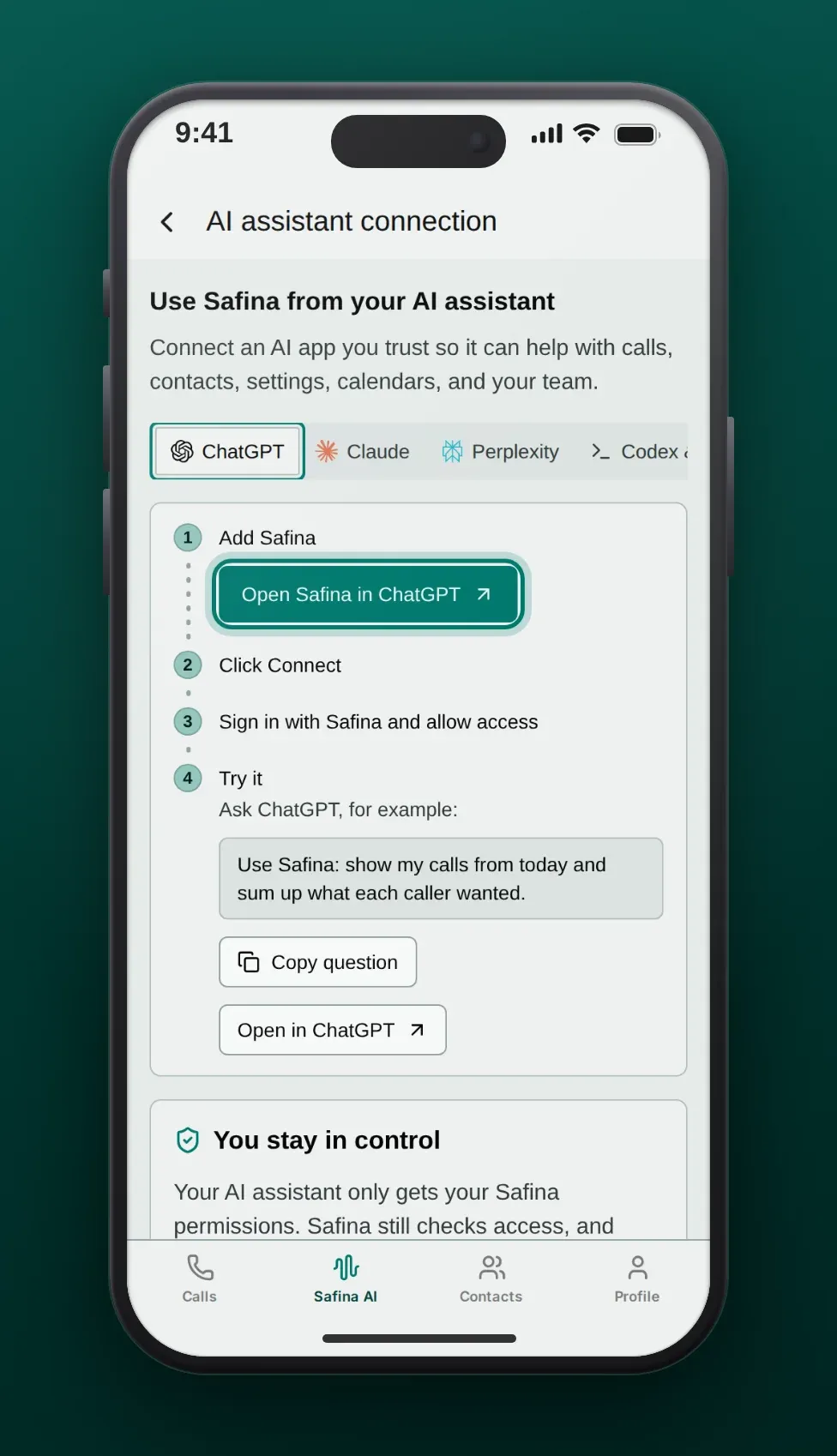
- In ChatGPT, find Safina in the plugin directory and choose Connect. In the Safina app, the button Open Safina in ChatGPT in the ChatGPT tab takes you there.
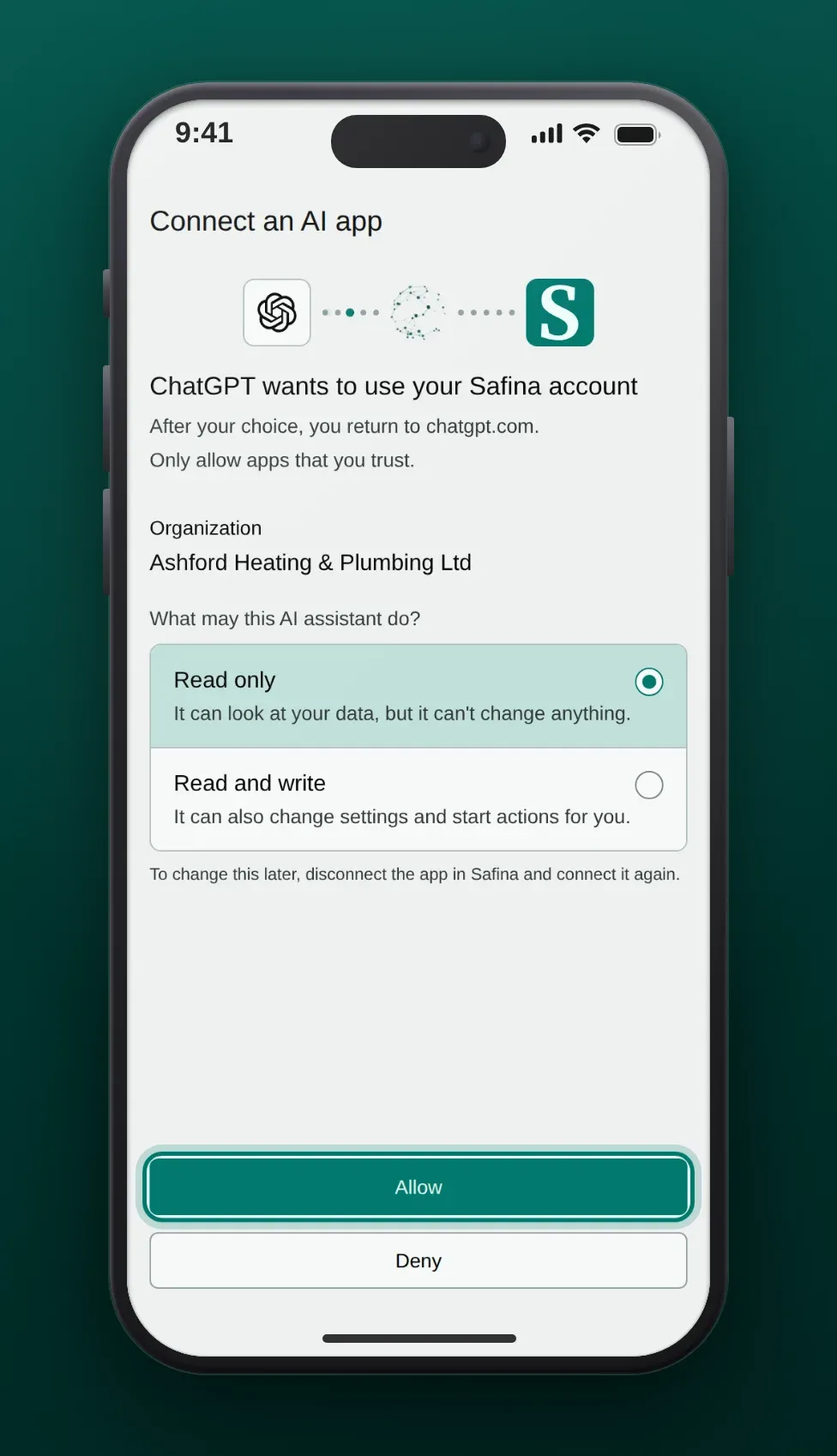
- Sign in to Safina in your browser, or create your Safina account there.
- Choose your team and whether ChatGPT may only read or also write, then choose Allow.
Back in ChatGPT, ask your first question, for example “Who called today?”
If Safina Is Not in the Directory Yet
Add Safina as a custom MCP server:
- Open Plugins, choose + and then Add custom MCP server.
- Enter the name “Safina” and the server address
https://api.backend.safina.ai/mcp/safina. Choose OAuth as the authentication. - Confirm the warning and choose Create as a plugin.
- Connect the plugin and sign in to Safina.
The guide Connect Safina to your AI assistant explains the access levels, how to stay safe and how to disconnect.
What ChatGPT Can Do with Safina
Read Your Calls
ChatGPT lists your recent calls and opens the details of one call: the caller, the reason, the key points and the to-dos. Each answer has a link to the call in the Safina app.
Manage Contacts
ChatGPT searches your Safina contacts, creates a contact for a new caller and updates existing details. Every change needs your confirmation in the chat.
Adjust Safina
ChatGPT can change the greeting and the voice, apply an industry template and show the setup steps that are still open.
Use Cases
Callback List After a Busy Day
A hairdresser asks ChatGPT: “Which callers asked for an appointment today?” ChatGPT lists them with their numbers, and she books the slots in the evening.
New Supplier in the Contacts
A shop owner tells ChatGPT the name and company of a new supplier who called twice. ChatGPT finds the number in the calls and saves the contact after his confirmation.
A Friendlier Greeting
A consultant asks ChatGPT for a shorter, warmer greeting. ChatGPT suggests one, he approves it, and Safina uses it from the next call.
Frequently Asked Questions
Which Safina plan do I need?
Any Safina plan: Basic, Pro, Business or Enterprise. You connect ChatGPT as the owner or an admin of your team.
Which ChatGPT accounts can use Safina?
OpenAI decides this. Account and workspace policies apply. In a work workspace, an admin may need to allow Safina first.
Why does ChatGPT show the price page instead of the plans page?
In ChatGPT, Safina shows the public price page. You choose and pay for your plan in the Safina app, not in the chat.
How do I disconnect ChatGPT?
Tap Disconnect next to ChatGPT in the Safina app (where to find it). ChatGPT loses access at once.
