Safina AI is listed in the Claude Connectors Directory, so you add it in Claude without typing a server address. Once connected, Claude reads your calls and their summaries, finds and updates your contacts, and changes how Safina answers the phone. You sign in to Safina once and choose whether Claude may only read or also make changes.
Connect Safina to Claude
- Open Safina AI in the Claude directory. In the Safina app, the button Open Safina in Claude in the Claude tab takes you there.
- Choose Connect.
- Sign in to Safina in your browser, or create your Safina account there.
- Choose your team and whether Claude may only read or also write, then choose Allow.
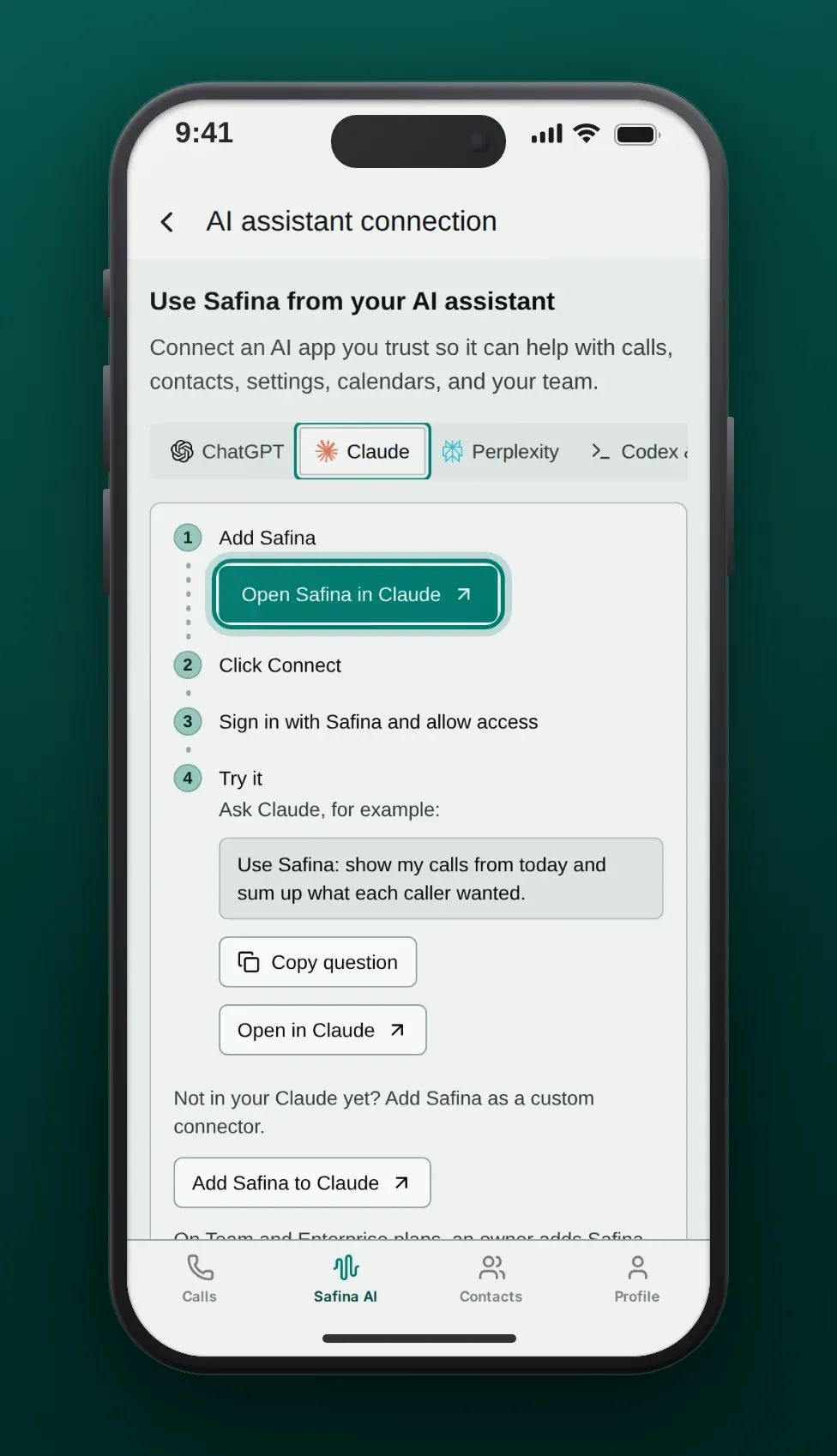
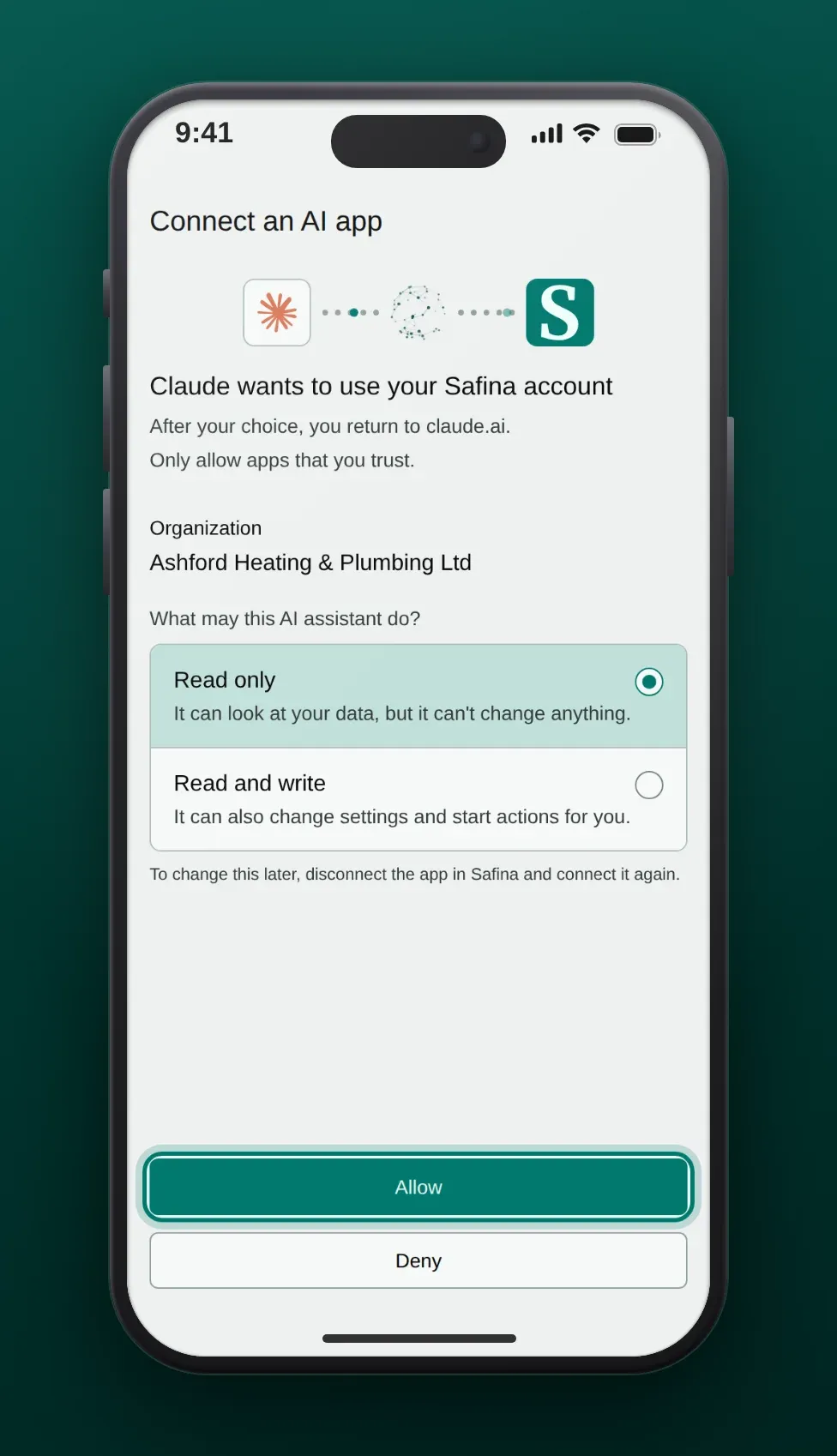
Back in Claude, ask your first question, for example “Who called today?”
If You Don’t Find Safina AI in the Directory
Open this link to add Safina to Claude. It opens Add custom connector with the name and the server address https://api.backend.safina.ai/mcp/safina filled in. Choose Add, then Connect, and sign in to Safina. In the Safina app, the button Add Safina to Claude below the steps in the Claude tab opens the same dialog.
Claude Team and Enterprise
An owner adds Safina for the organization first, under Organization settings > Connectors (link with Safina filled in). Members then connect it under Customize > Connectors and sign in to Safina.
The guide Connect Safina to your AI assistant explains the access levels, how to stay safe and how to disconnect.
What Claude Can Do with Safina
Answer Questions About Your Calls
“Who called this morning?” “What did the plumber’s customer want?” Claude reads your recent calls with their summaries and answers with a link to each call in the Safina app.
Keep Your Contacts Up to Date
Claude searches your Safina contacts, creates a contact for a new caller and updates a name or a company. Changes need your confirmation in the chat.
Change How Safina Answers
Claude can change the greeting, choose another voice and apply an industry template. It also shows which setup steps are still open.
Use Cases
Morning Check Between Appointments
A craftsman opens Claude on his phone: “Summarize yesterday evening’s calls and list the urgent ones.” Claude lists them, and he calls back the two urgent customers first.
Clean Contact List
After a trade fair, an office manager asks Claude to add three callers from this week to the contacts with their companies. Claude shows each change and saves it after her confirmation.
Greeting for the Holidays
A practice owner asks Claude for a holiday greeting that names the opening days. Claude writes it, she approves it, and Safina uses it from the next call.
Frequently Asked Questions
Is Safina in the Claude Connectors Directory?
Yes, as Safina AI. You connect it from the directory, without a server address.
Which Safina plan do I need?
Any Safina plan: Basic, Pro, Business or Enterprise. You connect Claude as the owner or an admin of your team.
Which Claude plans work?
Anthropic decides which Claude plans can use connectors. If you add Safina with the install link, it counts as a custom connector; on the Free plan, Claude allows one custom connector.
Can Claude pay for my plan?
No. Claude can give you a link to the Safina plans page. You choose the plan and pay there yourself.
How do I disconnect Claude?
Tap Disconnect next to Claude in the Safina app (where to find it). Claude loses access at once.
