English (United States)

Forwarding to an external number: This is how you use the "Human-in-the-Loop"

Use the intelligent forwarding of Safina AI to flexibly transfer callers to an external number. Learn here how to configure the 'Human-in-the-Loop'.

artificial intelligence and robot: a vector illustration with a white background, in a line art style. the robot is depicted in profile view, using blue lines to represent the circuitry of its brain and green for elements such as eyes or hands that have human-like features. it is also shown engaging directly in watching video on an iphone screen, adding another layer of realism to the scene

App Feature

artificial intelligence and robot: a vector illustration with a white background, in a line art style. the robot is depicted in profile view, using blue lines to represent the circuitry of its brain and green for elements such as eyes or hands that have human-like features. it is also shown engaging directly in watching video on an iphone screen, adding another layer of realism to the scene

App Feature

artificial intelligence and robot: a vector illustration with a white background, in a line art style. the robot is depicted in profile view, using blue lines to represent the circuitry of its brain and green for elements such as eyes or hands that have human-like features. it is also shown engaging directly in watching video on an iphone screen, adding another layer of realism to the scene

App Feature

Es gibt Gesprächssituationen, die eine individuelle Bearbeitung erfordern, die über die Standard-Automatisierung hinausgeht. Mit dem Feature „Weiterleitung an einen Menschen“ bietet Safina AI eine Schnittstelle, um Anrufer flexibel an eine von Dir definierte Rufnummer zu übergeben.

Obwohl wir das Feature im Dashboard so nennen, ist es technisch eine offene Brücke: Du entscheidest, welche Nummer hinterlegt wird und unter welchen Bedingungen Safina den Transfer einleitet.

Verfügbarkeit

Das Feature der intelligenten Rufweiterleitung (Smart Call Transfer) ist für unsere professionellen Business-Lösungen konzipiert.

Feature

Details

Verfügbarkeit

Business oder höher

Funktionsweise und Aktivierung

Sobald Du die Weiterleitung in der Web-App aktivierst und eine Nummer hinterlegst, ist Safina grundsätzlich bereit zur Übergabe. Standardmäßig bietet Safina die Weiterleitung immer dann an, wenn ein Anrufer explizit danach fragt (z. B. „Ich möchte mit jemandem persönlich sprechen“).

Möchtest Du diesen Prozess genauer steuern, nutzt Du Deinen Gesprächsleitfaden. Dort kannst Du spezifische Szenarien definieren:

  • Eingeschränkte Weiterleitung: Du kannst anweisen, nur weiterzuleiten, wenn beispielsweise ein technischer Notfall gemeldet wird.

  • Gezielte Trigger: Du kannst festlegen, dass die Weiterleitung erst angeboten wird, nachdem bestimmte Qualifizierungsfragen beantwortet wurden.

  • Individuelle Logik: Das Feature ist frei gestaltbar – theoretisch kann hinter der Nummer auch ein spezialisierter KI-Agent oder ein anderes Team sitzen.

Mehr dazu: Wie Du individuelle Anweisungen und Logiken in Deiner KI hinterlegst, erklären wir im Detail hier: Neue Fragen und Vorgaben im Gesprächsleitfaden erstellen

Konfiguration in der Web-App

Die Einrichtung erfolgt zentral im Bereich der Einstellungen Deiner Safina AI-Plattform.

  1. Login: Melde Dich in der Safina App an.

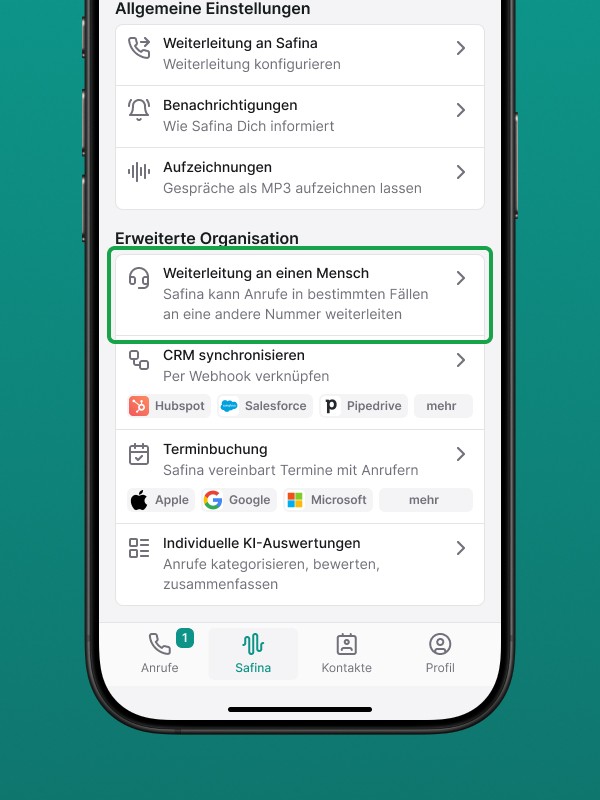
  2. Bereich: Navigiere zum Tab „Safina AI“ und scrolle zu den allgemeinen Einstellungen.


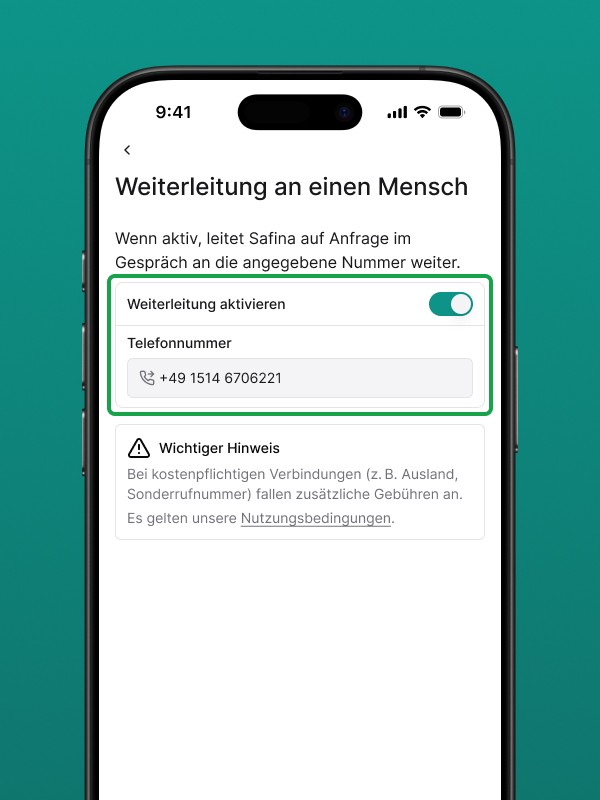
  3. Auswahl: Klicke auf den Punkt „Weiterleitung an einen Menschen“.


  4. Nummer: Hinterlege die gewünschte Zielrufnummer (idealerweise eine inländische Nummer).

  5. Aktivierung: Lege den Schalter um, um das Feature scharf zu schalten.

Wichtige Informationen zu den Verbindungskosten

Technisch baut Safina eine ausgehende Verbindung von Deiner Safina-Nummer zu Deiner hinterlegten Nummer auf. In der Regel sind inländische Verbindungen unproblematisch, dennoch gilt folgende Regelung zur Kostentransparenz:

Hinweis zu Gebühren: Safina AI übernimmt keine Kosten für die Weiterleitung an kostenpflichtige Nummern (z. B. Sonderrufnummern oder Auslandsverbindungen). Sollten durch die von Dir hinterlegte Nummer Kosten entstehen, stellen wir Dir diese eins zu eins zzgl. einer Bearbeitungsgebühr in Rechnung.

Wir empfehlen daher, stets eine reguläre Festnetz- oder Mobilfunknummer im selben Land zu verwenden, in dem auch Deine Safina-Nummer registriert ist, um die Kosten für Dich minimal zu halten.

Fazit

Die Weiterleitung ist das Bindeglied zwischen KI-Effizienz und individueller Betreuung. Durch die Aktivierung im Dashboard und die Feinjustierung im Leitfaden lässt sich das Feature exakt in Deine bestehende Unternehmensstruktur integrieren.

Möchtest Du Deine Weiterleitung jetzt einrichten?

Logge Dich in die Web-App ein und hinterlege Deine Nummer unter „Safina AI“.

Soll ich Dir als Nächstes zeigen, wie Du eine „VIP-Liste“ erstellst, damit bestimmte Anrufer sofort ohne Umwege durchgestellt werden?

Two smartphone screens with the Safina AI app. On the left is a detailed call summary with key points, a callback button, and AI evaluations such as mood, urgency, and interest. On the right is a call statistics overview for the last week, showing trusted, suspicious, and dangerous calls, as well as a list of recent calls.

Say goodbye to your old-fashioned voicemail!

Try Safina for free and start managing your calls intelligently.

Two smartphone screens with the Safina AI app. On the left is a detailed call summary with key points, a callback button, and AI evaluations such as mood, urgency, and interest. On the right is a call statistics overview for the last week, showing trusted, suspicious, and dangerous calls, as well as a list of recent calls.

Say goodbye to your old-fashioned voicemail!

Try Safina for free and start managing your calls intelligently.

Two smartphone screens with the Safina AI app. On the left is a detailed call summary with key points, a callback button, and AI evaluations such as mood, urgency, and interest. On the right is a call statistics overview for the last week, showing trusted, suspicious, and dangerous calls, as well as a list of recent calls.

Say goodbye to your old-fashioned voicemail!

Try Safina for free and start managing your calls intelligently.

Two smartphone screens with the Safina AI app. On the left is a detailed call summary with key points, a callback button, and AI evaluations such as mood, urgency, and interest. On the right is a call statistics overview for the last week, showing trusted, suspicious, and dangerous calls, as well as a list of recent calls.

Say goodbye to your old-fashioned voicemail!

Try Safina for free and start managing your calls intelligently.